TABLE OF CONTENTS
The APS Merchant Portal is a secure platform for managing your account, transactions, and essential business activities. Whether you're logging in for the first time, accessing your account regularly, or resetting your password, follow the steps below to ensure a seamless experience.
First-Time Access
If you're accessing the APS Merchant Portal for the first time, follow these steps to set up your account securely:
- Open the invitation email from the APS Merchant Portal.
- Click the link provided in the email to access the Merchant Portal.
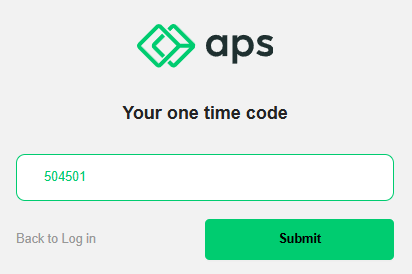
- Enter the one-time 6-digit code from the email and click Submit.
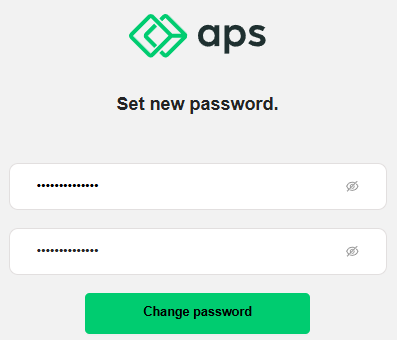
- Create a new password and click Change Password to save it.
- Log in to the Merchant Portal using your new password.
Resetting Your Password
If you've forgotten your password, you can reset it by following these steps:
- Open the Merchant Portal at https://merchant.aps.money/.
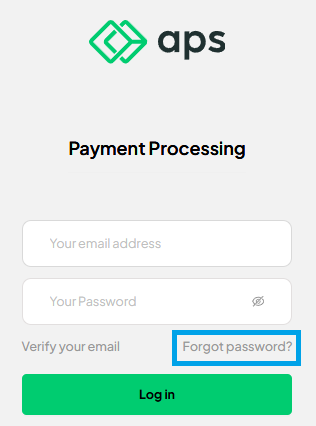
- Click the Forgot Password? link.
- Enter your email address and click Submit.
- Check your email for a recovery code.
- Enter the 6-digit code in the form and click Submit.
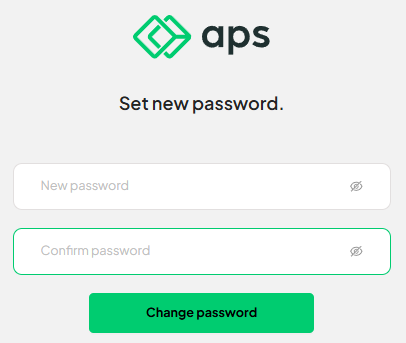
- Create a new password and click Change Password to complete the process.
Logging In
Once your account is set up, logging in is quick and easy:
- Open the Merchant Portal at https://merchant.aps.money/.
- Enter your email address and password.
- Click the Log In button to access your account.
Password Requirements
To maintain the security of your account, your password must meet the following criteria:
- Contain at least one lowercase letter.
- Contain at least one uppercase letter.
- Include at least one digit.
- Be 8 characters or longer.
- Include at least one special character from the following set:
!$#%&*+-.\/:<=>?@[\]^_{}~.
By following these guidelines, you can ensure your account remains secure and easy to access.
Was this article helpful?
That’s Great!
Thank you for your feedback
Sorry! We couldn't be helpful
Thank you for your feedback
Feedback sent
We appreciate your effort and will try to fix the article